


Blog
AI Agents vs AI Copilots: What Is the Difference and When Should Enterprises Use Each?

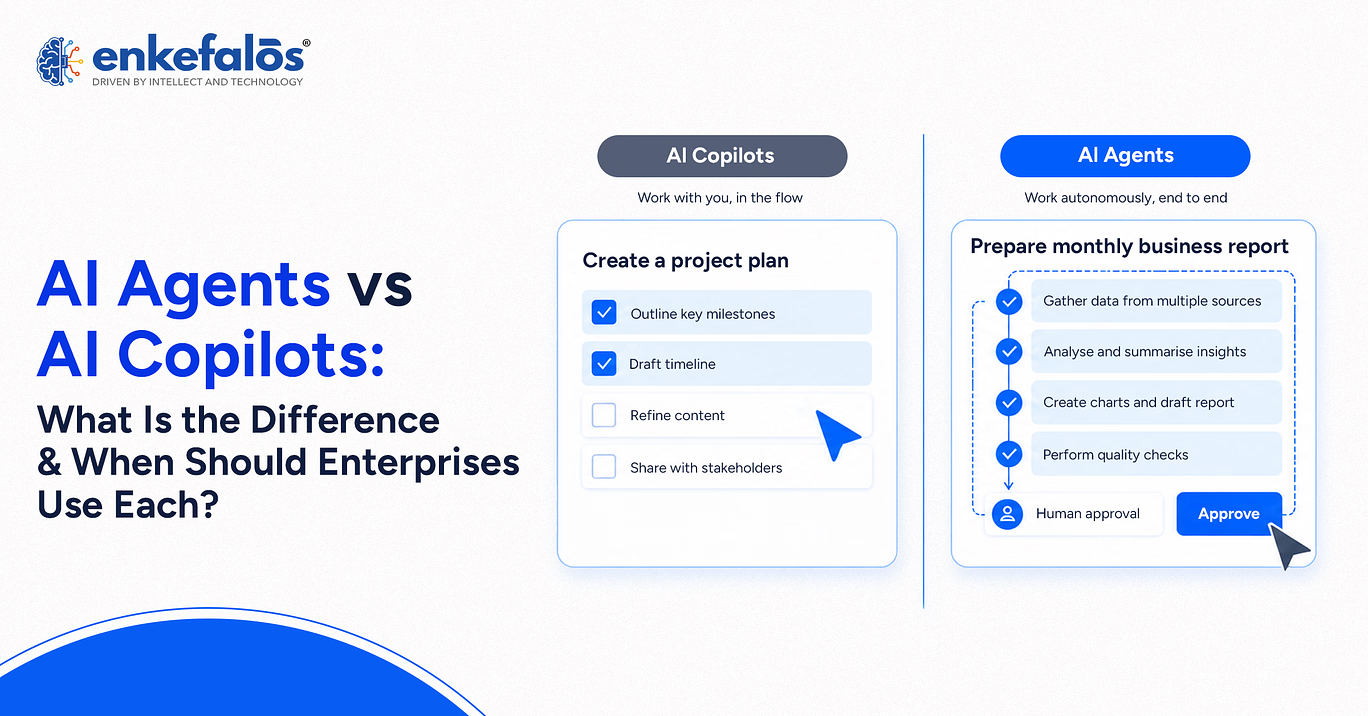
Enterprise AI is moving from systems that mainly answer questions toward systems that can also plan work, use tools, and take action. This shift has created two commonly used concepts: AI copilots and AI agents. Both can use large language models, enterprise data, APIs, and automation, but they are designed for different levels of user involvement and autonomy.
An AI copilot usually works alongside a person, helping with tasks such as drafting, summarizing, analyzing, or recommending the next steps. An AI agent can go further by pursuing a goal, deciding which steps to take, using available tools, and completing multi-step work with less continuous human direction. The boundary is not absolute, however. Modern enterprise products increasingly combine assistant and agent capabilities, so enterprises should evaluate actual behavior, permissions, and controls rather than relying only on product labels.
What Is an AI Copilot?
An AI copilot is an AI assistant designed to support a person within an existing workflow. It typically responds to user prompts, works with the context of the application or task, and helps the user complete work more efficiently.
A copilot may help users:
- Draft emails, reports, or presentations
- Summarize documents and meetings
- Analyze spreadsheets or business data
- Generate code
- Search enterprise knowledge
- Recommend actions
- Explain information
- Prepare first drafts for human review
Microsoft describes Copilot as a built-in assistant that helps users with context-specific tasks inside applications such as Outlook, Teams, Word, and Excel. This reflects the core copilot model: AI is embedded into a person’s work and remains closely connected to user direction.
What Is an AI Agent?
An AI agent is a software system that can work toward a defined goal by planning steps, making decisions, calling tools, and taking actions within the permissions it has been given.
Unlike a typical copilot that waits for prompts or user confirmation throughout a task, an agent may continue working after an initial instruction. It can break a goal into subtasks, decide which tools to use, retrieve information, execute actions, and adjust its next step based on the results. IBM describes agents as more proactive than assistants, with the ability to plan and execute multi-step processes from an initial goal.
An enterprise AI agent may:
- Query databases
- Update records
- Call APIs
- Create tickets
- Generate and send communications
- Trigger workflows
- Monitor systems
- Coordinate with other agents
- Escalate decisions to a human when required
This greater autonomy also creates a different governance requirement because an agent can affect business systems, not just generate content.
AI Agents vs AI Copilots: Key Differences
The main difference between AI agents vs AI copilots is the level of autonomy and responsibility delegated to the system.
|
Factor |
AI Copilot |
AI Agent |
|
Primary Role |
Assists a user |
Acts toward a goal |
|
Interaction Model |
User-led |
Goal-led |
|
Autonomy |
Usually lower |
Usually higher |
|
Typical Trigger |
User prompt |
Prompt, event, schedule, or system condition |
|
Task Scope |
Individual or bounded tasks |
Multi-step workflows |
|
Tool Use |
Often user-directed |
Can select and use tools autonomously |
|
Decision-Making |
Supports human decisions |
Can make defined operational decisions |
|
Human Involvement |
Frequent |
Depends on risk and workflow |
|
Best Fit |
Productivity and decision support |
Workflow execution and automation |
This is a spectrum rather than a strict binary. Some copilots can call tools, and some agents are designed to request human approval before every sensitive action.
AI Copilot vs AI Agent: How the User Experience Differs
The user experience is one of the clearest differences.
With a copilot, the interaction usually follows a pattern such as:
User asks → copilot responds → user reviews → user decides what happens next.
With an agent, the pattern may look more like:
User defines a goal → agent plans → agent uses tools → agent completes several steps → user reviews the result or handles an exception.
For example, a sales copilot may summarize an account and suggest a follow-up email. A sales agent could identify accounts needing follow-up, retrieve relevant information, draft the message, update the customer relationship management system, and schedule the next task within predefined permissions.
The important distinction is not whether the interface looks like a chat. It is how much authority the system has after the interaction begins.
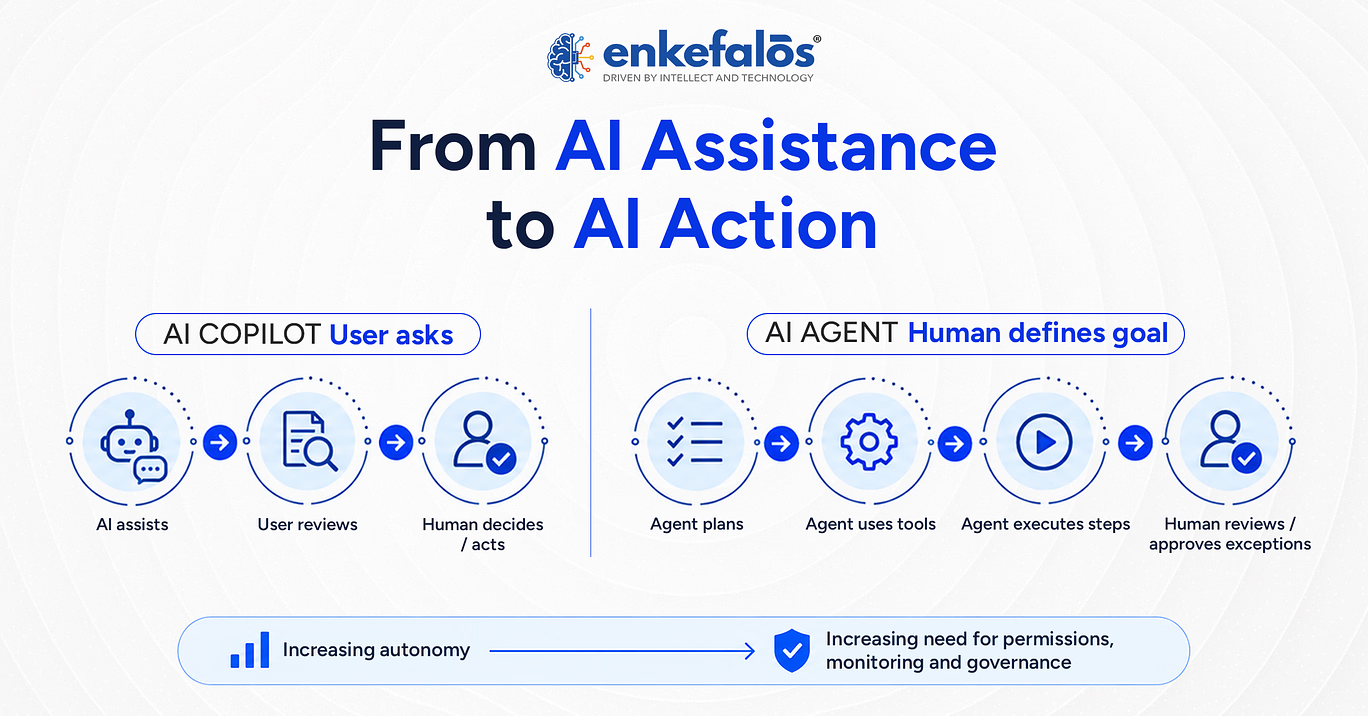
AI copilots typically keep the user closely involved in each decision, while AI agents can execute multiple steps with greater autonomy within defined permissions and escalation rules.
When Should Enterprises Use an AI Copilot?
An AI copilot is useful when human judgment remains central, and the AI primarily helps the employee work faster or make better-informed decisions.
Enterprises may choose copilots for:
- Writing and content creation
- Research and knowledge retrieval
- Meeting summaries
- Data analysis
- Coding assistance
- Customer-service support
- Sales preparation
- Financial analysis
- HR documentation
- Decision support
Copilots are especially appropriate when work is variable, subjective, or requires frequent human interpretation.
They can also be useful when an organization is early in AI adoption because the human remains closely involved in reviewing outputs and deciding whether to act.
When Should Enterprises Use an AI Agent?
AI agents become more useful when the goal is not only to assist with work but to complete a process.
Good agent use cases generally have:
- A clearly defined goal
- Access to required systems
- Repeatable business logic
- Observable outcomes
- Defined permissions
- Clear escalation rules
- Controls for high-impact actions
Examples include IT incident triage, invoice processing, employee onboarding workflows, supply-chain monitoring, service-ticket resolution, customer support orchestration, and software operations.
An agent may be more valuable than a copilot when asking a person to approve every intermediate step would remove most of the benefit of automation.
Can Enterprises Use AI Agents and Copilots Together?
Yes. In many enterprise architectures, agents and copilots work together.
A copilot can provide the human-facing interface while one or more agents perform work behind the scenes. Microsoft, for example, allows agents to extend Copilot with specialized knowledge, data access, and actions such as sending emails or updating records.
A common pattern is:
- An employee asks a copilot to complete a task.
- The copilot interprets the request.
- A specialized agent executes part of the workflow.
- The system requests approval for sensitive actions.
- The copilot presents the results to the employee.
This approach combines conversational interaction with more autonomous backend execution.
AI Agents vs Copilots: Enterprise Security and Governance
Governance requirements increase as AI systems gain more autonomy.
A copilot that summarizes a document mainly creates risks around data access, hallucination, privacy, and inappropriate output. An agent can introduce additional risks because it may change records, send messages, call external services, modify systems, or initiate financial or administrative actions.
Enterprise controls should address:
- Agent and user identity
- Role-based permissions
- Least-privilege tool access
- Data-access boundaries
- Model and tool inventories
- Logging and audit trails
- Human approval thresholds
- Runtime monitoring
- Output validation
- Incident response
- Lifecycle and version management
Microsoft recommends organization-wide governance baselines for agents covering identity, lifecycle management, observability, data governance, and compliance. OWASP similarly highlights risks such as excessive autonomy, tool abuse, privilege escalation, data exfiltration, memory poisoning, and high-impact actions.
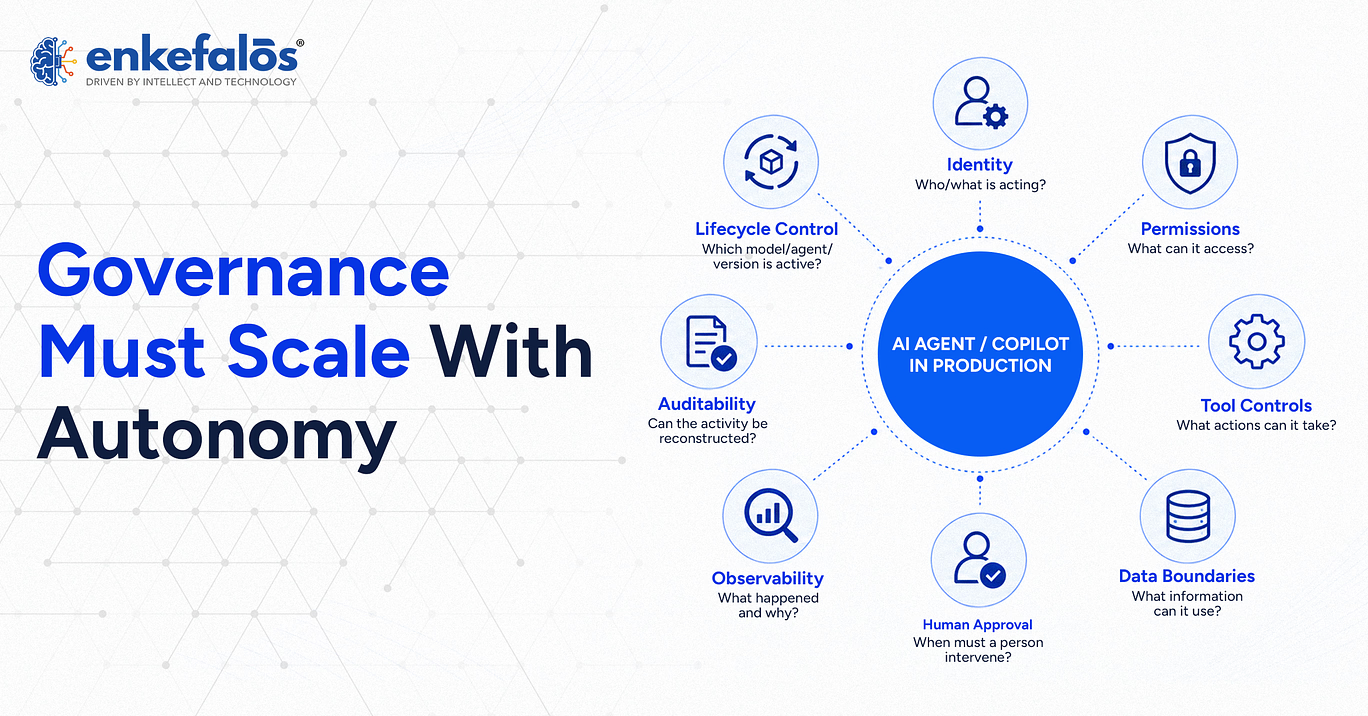
As enterprise AI becomes more autonomous, governance must extend across identity, permissions, data access, tool use, human approval, runtime monitoring, auditability, and lifecycle control.
Challenges of Deploying AI Agents in the Enterprise
AI agents introduce operational challenges beyond those found in conversational AI.
One challenge is tool permissioning. An agent with excessive privileges can create a larger security impact if it makes a poor decision or is manipulated by malicious input.
Another challenge is unpredictable workflow behavior. Agents may dynamically choose tools and action sequences, so teams need tracing and observability to understand what happened.
Enterprises also need to manage:
- Prompt injection
- Incorrect actions
- Cascading failures in multi-agent systems
- Poor-quality enterprise data
- Unbounded loops and cost
- Conflicting agent goals
- Version changes
- Human escalation
- Regulatory and audit requirements
OWASP recommends restricting tool access to the minimum required and requiring explicit authorization for sensitive operations.
AI Agents, Copilots, and Private AI
Both AI agents and copilots can be part of a private AI architecture.
Private AI generally refers to an operating model in which organizations maintain greater control over where enterprise data, models, retrieval systems, applications, and AI workloads are processed and governed. This may involve on-premises infrastructure, private cloud, hybrid environments, private model endpoints, or controlled enterprise services.
A private AI copilot may access approved internal documents without sending sensitive data to an unmanaged public environment.
A private AI agent can go further by interacting with internal databases, applications, APIs, or business systems while remaining subject to enterprise identity, network, policy, and audit controls.
Private deployment does not automatically make agents secure. Enterprises still need least-privilege access, data governance, logging, evaluations, approvals, and runtime safeguards. Microsoft guidance also emphasizes applying enterprise data governance consistently to agent activity.
How Enterprises Can Choose Between an AI Agent and AI Copilot
The decision should start with the workflow rather than the technology label.
Ask:
- Does the user need assistance or execution?
If the employee should remain in control of most decisions, a copilot may fit better. - How many steps are involved?
Multi-step workflows may benefit from an agent. - Can the actions be clearly bounded?
Agents work better when permissions and goals can be defined precisely. - What is the risk of wrong action?
High-impact actions may require approval even within an agentic workflow. - Does the system need to use tools?
Agents may need APIs, databases, SaaS systems, or enterprise applications. - How important is human judgment?
Subjective work may remain better suited to copilot-style assistance. - Can the organization monitor and govern the system?
Greater autonomy should be matched by stronger observability, identity, security, and governance.
Enterprises do not need to choose one model for every workflow. Different levels of autonomy can be used for different tasks.
How Much Autonomy Should Your AI Have?
Evaluate whether a workflow needs human-led assistance, agentic execution, or a controlled combination of both based on business risk, permissions, tool access, and oversight requirements.
The Future of Enterprise AI: From Assistance to Action
Enterprise AI is moving along a continuum from answering questions to taking action.
Copilots made AI accessible by placing generative AI directly into employee workflows. Agents extend that model by allowing AI systems to execute multi-step work across applications and business processes.
Google Cloud describes this transition as enterprises moving beyond basic AI assistants toward proactive agents that can reason through complex tasks and orchestrate workflows. IBM similarly describes the current enterprise focus as shifting from building agents to operating them safely at scale.
The likely future is not agents replacing copilots. It is a layered model in which employees interact with copilots, specialized agents complete delegated work, and enterprise control systems govern what both are allowed to access and do.
How Enkefalos Approaches Governed Agentic AI
Agentic AI changes the governance challenge because the system is no longer limited to generating recommendations. An agent may access enterprise data, invoke tools, update records, or trigger workflows. As that operational authority increases, enterprises need governance that applies both before deployment and while the agent is running.
Enkefalos addresses this through PreFrox, its Responsible AI Governance Platform. Its approach brings policy-driven oversight, risk management, human intervention, continuous monitoring, and auditability into the AI lifecycle rather than treating governance as documentation added after deployment. This allows organizations to define how AI should operate and maintain visibility as its behavior, models, data, and workflows change in production.
For agentic systems, that means establishing clear boundaries around which data and tools an agent can access, what actions it is permitted to take, when human approval or escalation is required, and how those actions are recorded for later review. Continuous evaluation can then help identify changes in behavior or risk as the system operates.
The objective is not maximum autonomy or constant human approval. It is controlled autonomy, where the level of freedom given to an AI agent is matched to the risk of the task, with accountability and human oversight applied where they matter most.
Govern AI as It Moves from Assistance to Action
Bring policy enforcement, monitoring, human oversight, accountability, and auditability into AI workflows as agents take on greater operational responsibility.
Conclusion
The difference between AI agents and AI copilots mainly comes down to how much responsibility the AI system takes within a workflow. Copilots work alongside employees by providing information, recommendations, drafts, and other forms of assistance. AI agents can take the next step by planning and completing multi-step tasks within defined permissions.
Enterprises do not always need to choose one over the other. Copilots can support human-led work, while agents can automate suitable processes behind the scenes. The right approach depends on the workflow, level of autonomy required, potential impact of incorrect actions, and the organization’s ability to provide security, governance, monitoring, and human oversight.
Frequently Asked Questions
1.What is the difference between an AI agent and an AI copilot?
An AI copilot primarily assists a user with tasks, while an AI agent can plan and execute multiple steps toward a defined goal with less continuous human direction, within its assigned permissions.
2. Are AI agents more autonomous than AI copilots?
Generally, yes. Agents can continue working after initial instruction, while copilots more often depend on ongoing user prompts or review.
3. Can an AI copilot become an AI agent?
A copilot can be extended with agent capabilities such as tool use, planning, and workflow execution. In practice, the distinction depends on the level of autonomy and authority the system is given.
4. Can enterprises use AI agents and copilots together?
Yes. A copilot can act as the user interface while agents perform specialized or multi-step work in the background.
5. What are the best enterprise use cases for AI agents?
Common use cases include IT operations, workflow automation, service management, customer support, onboarding, finance operations, and other multi-step processes.
6. What are the best enterprise use cases for AI copilots?
Copilots are useful for drafting, summarizing, analysis, coding assistance, knowledge retrieval, meeting support, and decision assistance.
7. Are AI agents secure for enterprise use?
AI agents can be deployed with enterprise security controls, but they require strong identity, least-privilege permissions, logging, tool restrictions, runtime monitoring, and human approval for sensitive actions.
8. Do AI agents require human approval?
Not for every action. Approval requirements should depend on risk. High-impact, irreversible, financial, administrative, or security-sensitive actions may require human review.
9. How do enterprises govern AI agents?
Enterprises can govern agents through identity controls, lifecycle management, policy enforcement, data governance, tool permissions, observability, evaluation, audit logs, and approval of workflows.
10. Can AI agents work with private enterprise data?
Yes, if they are connected through approved and governed data-access mechanisms. Access should follow enterprise security, privacy, identity, and compliance policies.